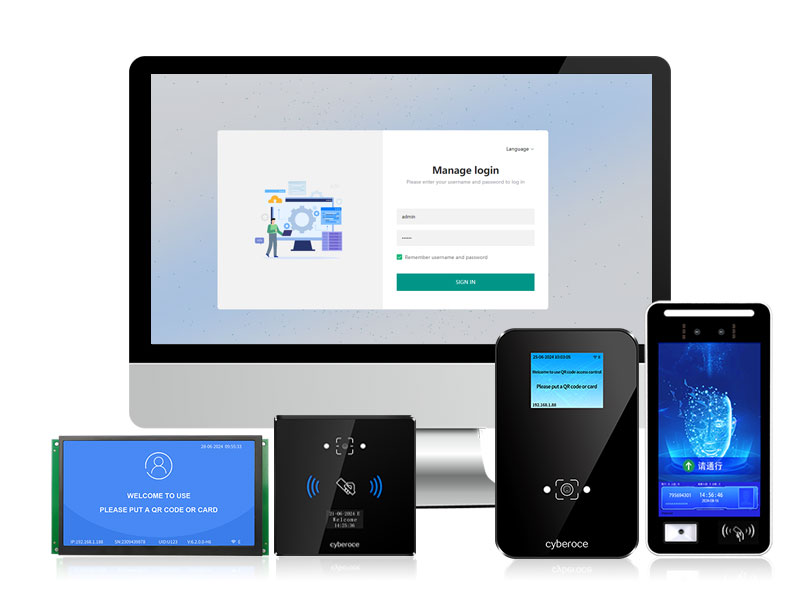
No need to install any software, the browser can access the IP to configure it! Specially designed for system integrators and platform providers, completely free from the constraints of Windows. Cross platform compatibility, HTTP/MQTT one click docking, from underlying protocols to UI customization, the Cyberoce QR code access control WEB configuration tool gives you unprecedented development freedom, doubling project delivery efficiency.
Table of contents:
Text:
Our company has upgraded the
QR code access control(AIO device) WEB configuration tool by collecting feedback from different customer needs. Based on the original configuration tool, we have added and improved many functions, which are more in line with the needs of system integrators and software platform vendors with development capabilities. Users do not need to install the client side. After connecting to the network, they can access the device IP through a browser to configure it. It does not rely on Windows or specific systems, is cross platform compatible, and can complete multi-dimensional parameter configuration in one stop. Its operation meets the needs of on-site construction and equipment debugging, and can efficiently adapt to various scenarios such as QR code access control, scenic spot ticket checking, and unmanned scanning entry. This article will provide a detailed explanation of the practical operation points and configuration specifications of the QR code access control WEB tool.
I. Scope of adaptation and general preset configuration of QR code access control web tool
The newly produced and shipped
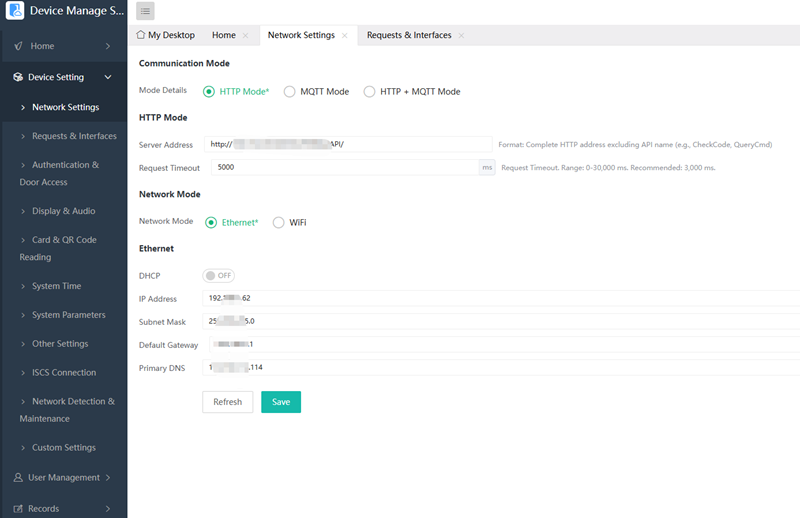
QR code access controller basically support this WEB configuration tool. The equipment has completed universal configuration before leaving the factory and does not require secondary debugging: the CPU is bound with a unique ID and synchronized to the server, Ethernet WiFi、 The device address, network connection method, and combination of http/https/mqtt are all universal presets; The device request, permission verification configuration, and facial recognition and ticketing devices are consistent and can be directly referenced from previous configuration specifications.
II、 QR code access control screen display and refined voice configuration
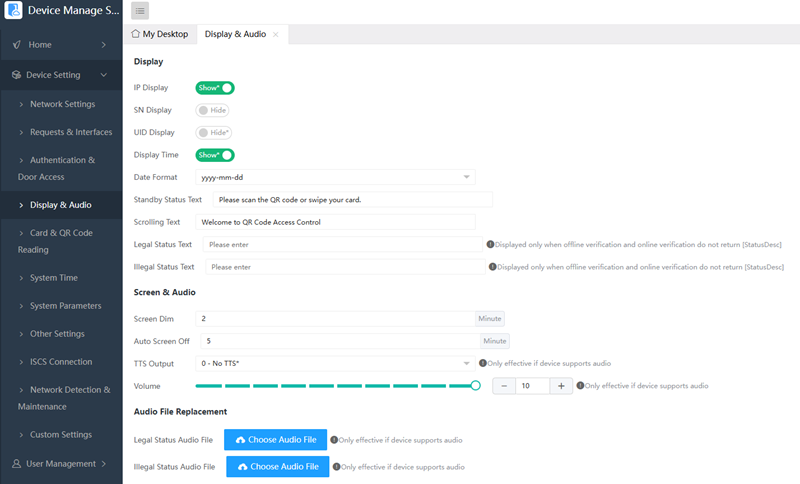
The display and voice configuration of QR code access control screens need to be distinguished according to the screen type and model of the device. The customization functions of different models vary greatly, and the core is to adapt to the hardware design and usage scenarios of the device.
1. The 0.96-inch small screen model is mainly aimed at high cost-effectiveness and is the company's best-selling QR code access control product, suitable for different installation environments and application scenarios. It can turn on or off the display of standby time. The default format for display is year, month, day, and the default text for standby is "Welcome", which supports custom modifications.
In order to extend the lifespan of the device (which can increase the service life of OLED screens to 3-5 years), QR code access control will automatically turn black after being left idle. This is a normal screensaver function, not a malfunction, and does not require any manual intervention. Scanning or swiping the card will automatically wake up the screen.
2. There is also a 2.0-inch screen QR code access controller, which has richer screen display and voice functions. You can use a web configuration tool to directly configure the parameters for displaying devices such as IP and SN. It supports custom standby text, scrolling text, legal or illegal prompts, as well as setting font colors and UI mode background images. You can also adjust the brightness of the screen, set the duration of screen off or low brightness, and use DS digital signature function. It supports uploading AV format files to replace the default voice, and the replacement will take effect immediately.
III、 QR code access control card reading and scanning core function configuration
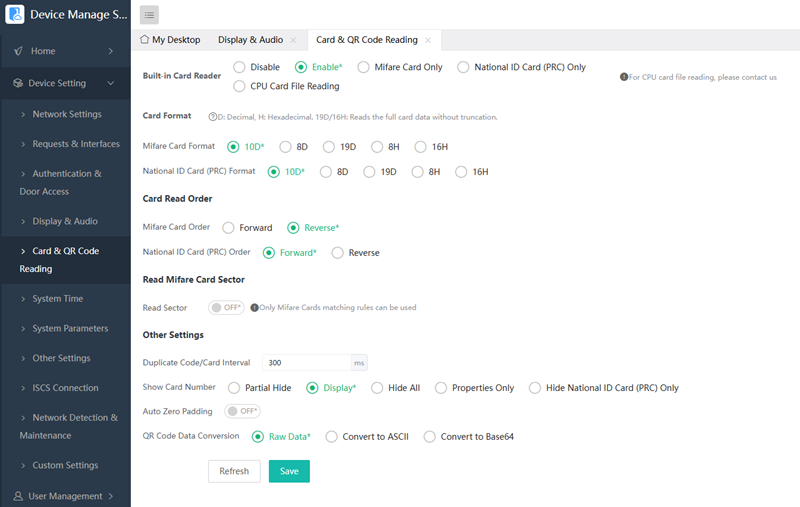
Reading cards and scanning codes are the core functions of QR code access controller. The WEB configuration tool has added practical functions on the basis of the original configuration tool, which can meet the needs of reading various card numbers and scanning code recognition. For reading IC cards, an 8-digit card conversion method has been added, which includes three conversion modes commonly used in the industry, including the first three and last five combinations, and can adapt to the needs of reading different card numbers. The core point of configuring for scanning is to solve the problems of garbled or blank codes. If the device buzzer sounds after scanning the code, but the card number displayed on the screen is different from the original authorized card number, the transcoding function needs to be used; Or when scanning QR codes on WeChat and displaying them as garbled characters, which belong to invisible characters, they must be transcoded first and then transmitted to the background to avoid data confusion.
The WEB configuration tool endows devices with more intelligent recognition strategies: it supports customizing exclusive scanning modes for electronic screen codes and paper codes, and can dynamically adjust the fill light intensity to break through low light environment limitations. This targeted parameter tuning greatly improves the recognition success rate and brings users an extremely smooth travel experience.
IV、 QR code access control all-in-one machine Wiegen/RS485 configuration
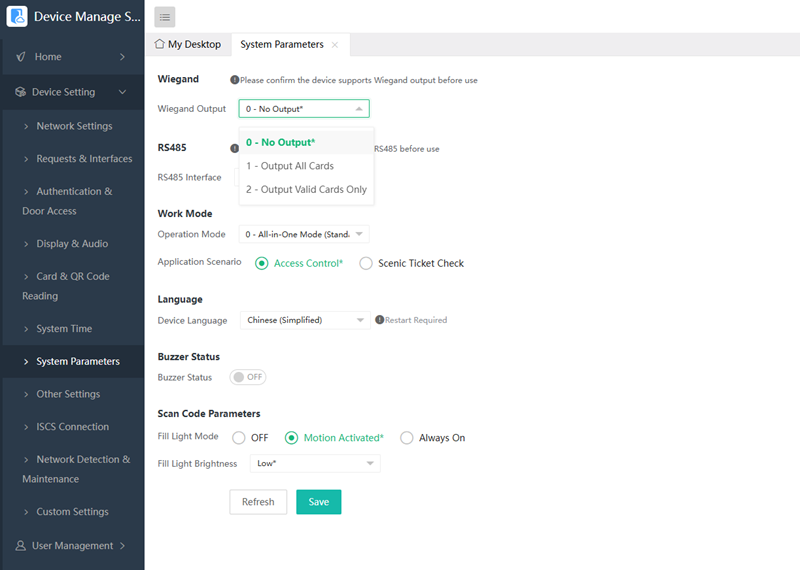
This configuration belongs to the core focus project of the tool. The initial purpose of designing the Cyberoce QR code access controller was to independently complete access control. Wiegand and RS485 are newly added functions in the later stage, and both options will be displayed in the configuration tool, requiring manual selection of the type that matches the hardware. Weigen is a hardware fixed output that can choose not to output, output all cards or codes, or output only valid cards or codes. The number of output bits supports multiples of 8 or multiples of 8 plus the number 2, and the appropriate controller should be selected according to the requirements. RS485 is a bidirectional transmission, and the output options are the same as Wiegand. When the QR code access control device is connected to external ladder control motherboards/security modules and other devices, it needs to pass through the RS485 port and use a dedicated protocol.
V、Selection and configuration of QR code access control security module
The security module belongs to the accessories that can be selected for the QR code access controller. It can make up for the shortcomings of the QR code access controller in terms of security and relay power. It communicates with the integrated device through RS485 private protocol and matches the protocol during configuration. This module integrates relays and door locks for operation. Even if the QR code access controller is disconnected or removed, short circuiting cannot open the door, which can greatly improve the security level of access control. The logic control is still completed by the QR code access control. It is recommended to use it in scenarios with high security requirements such as bank and laboratory access control.
The relay using the security module can be directly adapted to various high-power door locks without the need for an additional access control power supply. The security module can be installed indoors, on the ceiling, or inside the computer room, which is the same as the installation requirements for split type access control controllers.
VI、QR code access control Web configuration tool IP settings and usage specifications
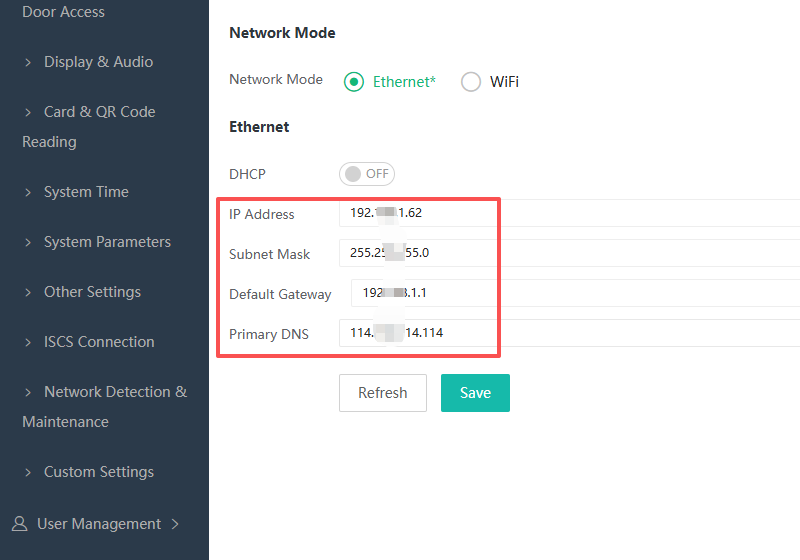
The web configuration tool has flexible IP settings, allowing for the selection of fixed or automatic IP acquisition to meet the needs of on-site construction and debugging. Suitable for rapid on-site debugging.
All configuration logic of the Cyberoce WEB configuration tool is designed around the hardware characteristics and actual usage scenarios of the QR code access control device. Different models have their own focus on configuration, and operators only need to master the core configuration points and complete the corresponding parameter settings according to the device model and usage scenario to achieve accurate configuration of the QR code access control device. Sebros will continue to iterate and upgrade the WEB configuration tool based on industry development trends and customer needs, continuously adding practical functions, and synchronously updating new functions to all operators, helping the QR code all-in-one machine achieve stable and efficient operation in various scenarios such as access control and ticket checking.
