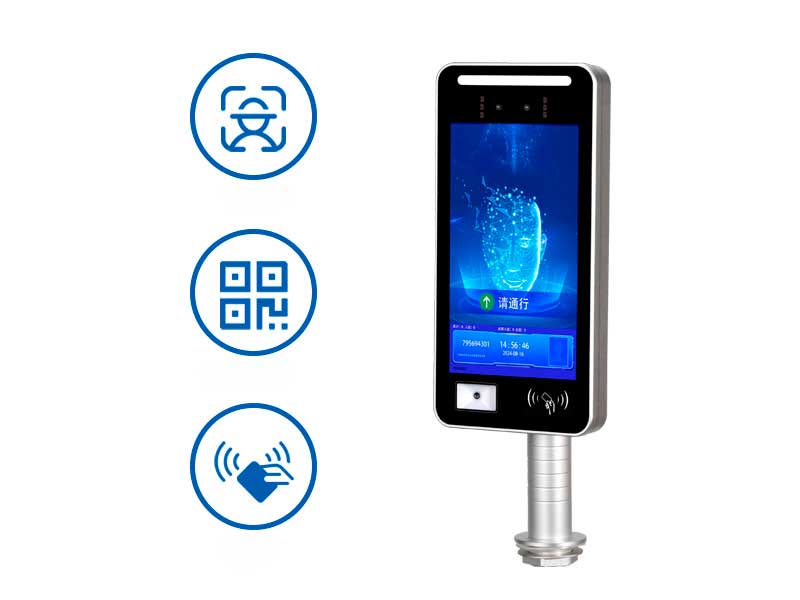
Face+QR code+card swiping three in one multifunctional access control with built-in web configuration interface, supports multiple languages, fully functional local management, no client required, compatible with mainstream browsers, helps overseas integrators quickly connect and efficiently deploy, ensures data privacy compliance, and easily embeds into their own platforms.
Table of contents:
Text:
In the field of intelligent pedestrian access hardware control, we are committed to transforming professional hardware into an open platform that is easy to integrate and manage. Our company's three in one multi-functional access control hardware includes facial recognition, QR code recognition, and card swiping. It is equipped with a complete web server, and developers can access the configuration interface by entering the IP address that comes with the facial recognition when the device is turned on in the browser. This provides a configuration tool that can be quickly integrated and debugged for overseas system integrators or software platform vendors with development capabilities.
I、QR code and facial recognition access control WEB configuration tailored for development oriented customers.
1. Ready to use out of the box, seamlessly integrated
The QR code and facial recognition access control comes with a web management interface from the factory. After connecting to the local area network, enter the IP address that comes with the face when turning on to access. Support mainstream browsers (Chrome, Edge, Firefox, etc.), without the need to install clients or rely on specific operating systems, without worrying about compatibility with the client's running system during client installation, significantly reducing the threshold for on-site debugging and shortening the project launch cycle.
2. Fully function opening, deeply adapted to your platform
QR code facial recognition access control device management and configuration can be completed on the webpage, such as scanning codes, swiping cards, facial photo size and other functions, without contacting technical support to obtain configuration codes or using independent configuration tools. The interface is clear and intuitive, and settings can be completed through buttons, switches, and sliders. It can also switch between Chinese, English, and Mandarin for overseas customers. You can directly call the local interface of the device according to the requirements of your company's system platform to achieve batch distribution of personnel information, real-time access record pulling, remote restart and other operations, seamlessly embedded into your company's unified management platform.
3. Ensuring data sovereignty and compliance
All configurations, logs, and facial feature data are only circulated within the network designated by the customer, without going through third-party cloud platforms, ensuring that facial privacy is not leaked. Meet international data privacy regulations such as GDPR and CCPA, especially suitable for government, financial, healthcare, and education scenarios that are highly sensitive to data sovereignty. Even if the external network is interrupted, the QR code facial recognition access control can store up to 50000 faces and 1 million records locally, and authorized personnel can open the door normally.
II、Introduction to commonly used management modules for QR code facial recognition access control WEB configuration:
1. Equipment management:
Network settings: Used to configure the interface configuration, QR code facial recognition access control, and the address of the developer's backend software server connection, as well as whether to use Ethernet or WIFI networking mode
Verification settings: Used to verify whether the QR code opens the door online or locally first, and then request online verification to open the door when there is no whitelist locally.
Facial comparison parameters: Facial comparison threshold, the larger the threshold, the higher the security, and the lower the threshold, the higher the pass rate. Our company's default threshold for access control is around 65.
Card reading settings: used to set card swiping format, forward and reverse sequence, whether to read sectors and other parameter settings
2. Personnel management:
You can add local whitelist personnel information, facial database, door opening permission timeliness etc.
3. Record viewing:
real-time communication logs, event queries, data exports, and other functions
We have made the tedious device layer configuration web-based and localized, allowing overseas system integrators and software platform vendors to overcome "tool dependency" and invest valuable time and energy into system platform development and project undertaking business expansion. This is not a simple QR code facial recognition three in one access control, it is an intelligent edge node that can be seamlessly absorbed by your platform right out of the box.
If you also have similar requirements, please search for "cyberoce" and ask the official customer service for development documents.
